
Download AI Video Tool – AI Subtitle Generator, Local Processing, Offline Video Transcription
Overview
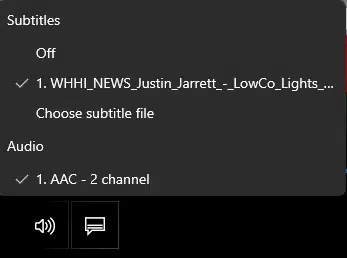
AI Video Tool is a specialized Windows application engineered to generate accurate subtitle files in the .srt format directly from MP4 video files. Designed with privacy and efficiency in mind, the app leverages advanced local AI models to transcribe spoken content without requiring an internet connection. This makes it particularly valuable for content creators, educators, and professionals who handle sensitive or proprietary video material and need to maintain full control over their data. The tool addresses the common pain points associated with online subtitle generators—such as data exposure, inconsistent accuracy, and dependency on network availability—by processing all tasks locally on the user’s device.
Target users include video editors, YouTubers, language instructors, and anyone involved in multimedia content production who requires reliable, fast, and secure transcription. The application supports multiple spoken languages and offers translation capabilities, expanding its utility across global content workflows. By enabling offline operation and local AI processing, AI Video Tool enhances workflow continuity and reduces reliance on third-party services. Its role in the digital content ecosystem is significant, offering a privacy-first alternative to cloud-based transcription tools. The developer did not provide additional technical details about the background or development history.
Key Features & Functionality
- Local Processing: All transcription and subtitle generation occur entirely on the user’s device, ensuring no data leaves the system. This eliminates risks associated with data breaches or unauthorized access, making it ideal for confidential or sensitive content.
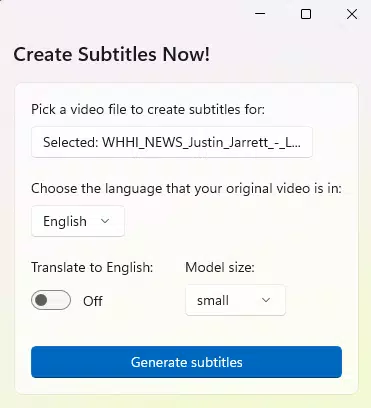
- Multiple AI Model Sizes: Users can select from three AI model variants—Tiny, Small, and Medium—each offering a different trade-off between transcription accuracy and system resource usage. This allows users to optimize performance based on their hardware capabilities.
- Language Selection: The app enables users to specify the spoken language of the video input, improving transcription accuracy. This feature is especially useful for multilingual content creators or those working with non-English audio.
- Translation Support: Transcripts generated from the video can be translated into multiple target languages, increasing accessibility for international audiences and supporting multilingual content distribution.
- Efficient Audio Chunking: The tool intelligently divides audio into manageable segments for processing, which improves transcription speed and accuracy, particularly for longer videos.
- Offline Operation: The application functions without an internet connection, allowing users to generate subtitles anytime and anywhere, even in low-connectivity or secure environments.
For example, a language instructor preparing a lecture video can use the app to generate accurate subtitles in English, then translate them into Spanish for a bilingual class. Similarly, a content creator working on a remote project can transcribe and subtitle a video without relying on cloud services or online tools.
Interface, UX & Performance
The user interface of AI Video Tool is designed to be straightforward and functional, focusing on core tasks without unnecessary complexity. Navigation is intuitive, with clear buttons for loading video files, selecting language options, choosing AI model size, and initiating transcription. The layout emphasizes usability, allowing users to complete the entire workflow in minimal steps. Visual feedback is provided during processing, including progress indicators and status updates.
Although the developer did not list formal performance metrics, the app’s reliance on local AI models suggests optimized execution tailored to common desktop hardware. The interface remains responsive during processing, and the app maintains stability across different system configurations. Users can expect consistent behavior when handling videos of varying lengths and audio quality. The performance on low-end systems may depend on the selected AI model size, with the Tiny model likely offering better responsiveness on resource-constrained devices. Overall, the UX prioritizes clarity and control, minimizing user friction during the transcription process.
Platform Compatibility & Technical Requirements
AI Video Tool is designed for the Windows operating system. The app’s file size and software version were not disclosed in the provided information. Specific requirements for system specifications, such as RAM, CPU, or GPU, were not listed. The developer did not specify minimum OS requirements, nor did they provide details about compatibility with different Windows versions or hardware configurations. As a result, users should verify system compatibility independently based on their device capabilities.
The application operates without internet access, which enhances its utility in secure or isolated environments. However, the lack of detailed technical specifications means users must rely on general system performance indicators when assessing suitability. The absence of version-specific compatibility notes suggests the app may be designed for broad Windows support, but this cannot be confirmed without additional data.
Pros and Cons
Pros
- Processes all data locally, ensuring complete privacy and no data transmission.
- Functions entirely offline, enabling use without internet connectivity.
- Offers multiple AI model sizes for flexible performance and accuracy trade-offs.
- Supports language selection and translation, enhancing accessibility and global reach.
- Streamlines subtitle creation with intelligent audio chunking and efficient processing.
Cons
- Specific system requirements were not disclosed, making compatibility assessment difficult.
- File size and version details were not provided, limiting user expectations.
- Platform availability is limited to Windows; no information was given about other operating systems.
- Developer background and support details were not included.
- Performance on low-end devices may vary depending on the selected AI model.
FAQ
Is AI Video Tool safe to use?
Yes, the app is designed with privacy in mind. All processing occurs locally on your device, and no data is sent over the internet, ensuring your video content remains secure.
Can I use AI Video Tool without an internet connection?
Yes, the application operates entirely offline. You can generate subtitles without needing an internet connection, making it suitable for secure or remote environments.
Does AI Video Tool support multiple languages?
Yes, users can select the spoken language of the video and translate the transcript into other languages, supporting multilingual content creation.
What AI models are available in the app?
The app offers three AI model sizes: Tiny, Small, and Medium. Each provides a different balance between accuracy and system resource usage.
Is AI Video Tool available for Android or iOS?
Based on the provided information, AI Video Tool is designed for Windows only. No details were given about availability on mobile platforms like Android or iOS.
Final Thoughts + CTA
AI Video Tool stands out as a privacy-focused, efficient solution for generating accurate subtitles from MP4 videos. Its ability to operate entirely offline, combined with support for multiple languages and flexible AI model selection, makes it a valuable tool for content creators who prioritize data security and workflow autonomy. While specific technical details such as system requirements and file size are not available, the app’s core functionality is clearly designed with real-world usability in mind. It offers a reliable, secure alternative to cloud-based transcription tools, particularly for users handling sensitive or confidential material.
Whether you're a video editor, educator, or digital content producer, AI Video Tool delivers a streamlined experience that enhances productivity without compromising privacy. Its focus on local processing and translation capabilities positions it as a strong choice in the growing market for AI-powered media tools.
Download AI Video Tool now


